This article is part of the guide to SEO Rules in FiboFilters. If you’re new to SEO Rules, start there first.
For each SEO rule, FiboFilters lets you set the title tag (<title>), the meta description tag (<meta name="description">), the headline (<h1>), and the copy displayed above and below the product grid. Instead of hardcoding these elements, you can use placeholders, so that all the values – like the shop name and filter name – are filled in automatically.
Available placeholders
| Placeholder | What it renders | Example output |
{site_title} | Site name from WordPress settings: Settings > General > Site Title | My Shop |
{separator} | The title separator from your active SEO plugin. Renders to - if no SEO plugin active. | | |
{page} | Empty on page 1; separator + “page X of Y” from page 2 onward | | page 2 of 7 |
{category} | Current product category name (empty outside category pages) | Sneakers |
{archive_title} | Taxonomy type label | Category |
{filter.SLUG} | Label of the selected filter value (not the slug) | Red |
{filter.SLUG.min} | Lower bound of a range filter; empty if not set; does not contain units | 10 |
{filter.SLUG.max} | Upper bound of a range filter; empty if not set; does not contain units | 50 |
Tip: click a placeholder to insert it at the cursor position – no need to copy it or type it manually.
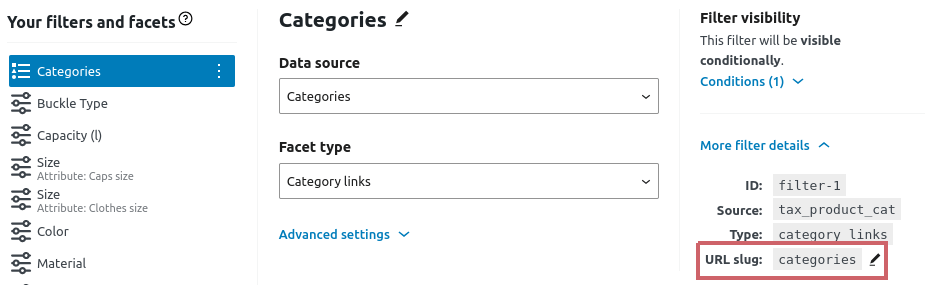
SLUG is the filter URL slug – you can check it under filter details:
Examples
Example 1:
Template: {filter.color} {category} | {site_title} {page}
On page 1 renders to: “Red Sneakers | My Shop”
On page 2 renders to: “Red Sneakers | My Shop – page 2 of 3”
Note that {page} is automatically prefixed with the separator.
Example 2:
Template: {archive_title}: {filter.clothes-size} {category}
Renders to: “Category: XXL T-shirts”
Example 3:
Template: {category} under ${filter.price.max}
Renders to: “Backpacks under $50”
Note that {filter.price.max} does not print the currency – you need to add it manually.